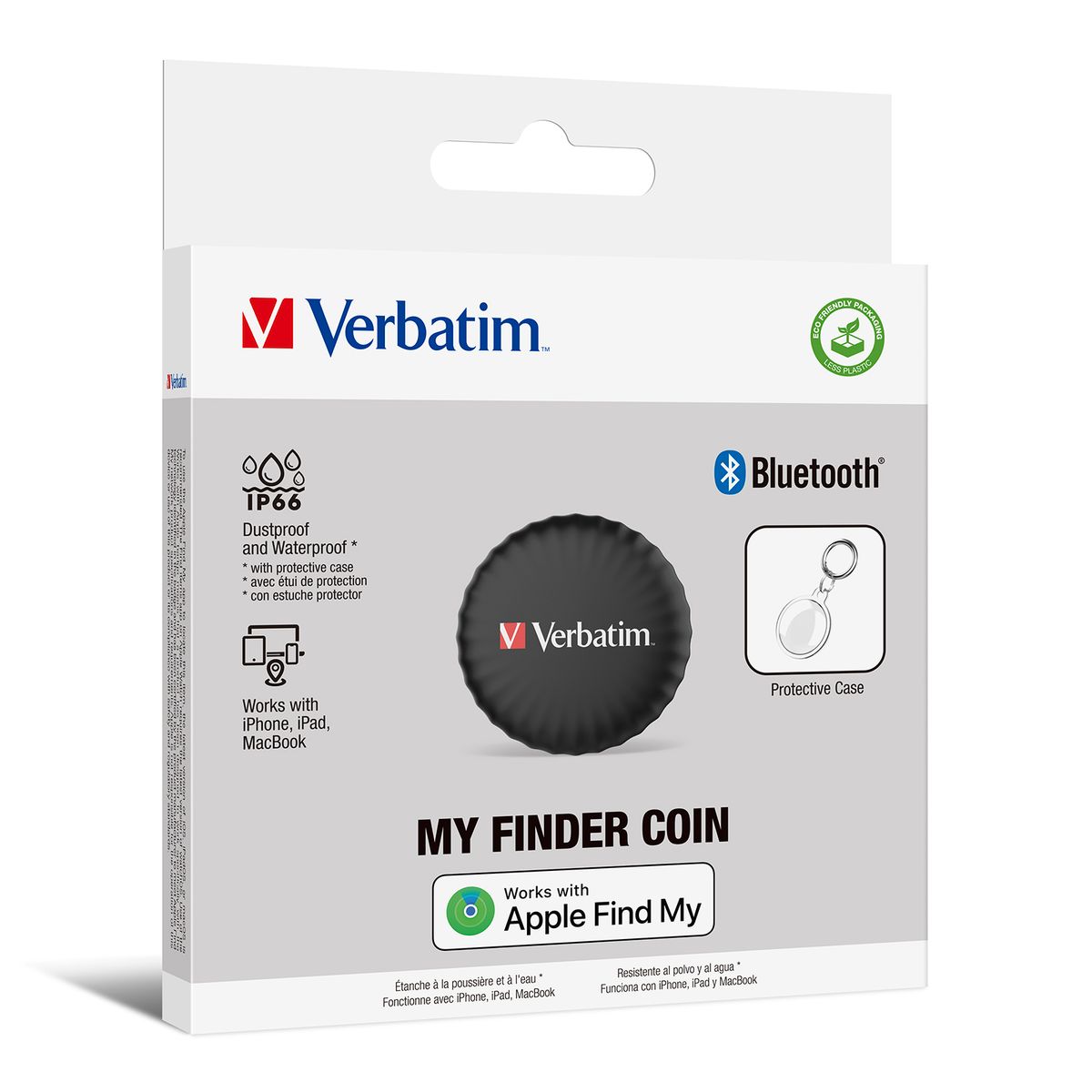
Track your essentials with Verbatim’s My Finder Coin
Verbatim’s My Finder Coin is a tracking device that works exclusively with Apple’s Find My App. Simply attach My Finder Coin to any item that you need to keep track of and you can locate the item through the Find My App on your iPhone, iPad and MacBook.
Misplaced keys, bags and other valuables are a thing of the past with Verbatim’s My Finder Coin Bluetooth tracker. Simply attach the versatile tag to the item you want to track and use Apple Find My app to locate it when missing.
Within the app’s Lost Mode, you can enter your contact details in the event that your missing item is located by someone else in the Apple Find My network.
Locate by sound or map
Utilising the Apple Find My ecosystem, you can easily track your item’s location. If you are in close range, select “Play Sound” in the app and follow the beep to find your lost item. Alternatively, select your missing item in the app and locate it on a map. The whole process is anonymous and encrypted to protect your privacy.
Long battery life
Equipped with a Lithium battery, enjoy over 12 months battery life – no need for frequent battery changes. Having IP66 protection with the protective case, the My Finder Coin is water-resistant and dustproof for durability.
Smart Notifications
With smart notifications enabled by default, you’ll receive an alert on your phone when your My Finder Coin is out of your Bluetooth range. Attach it to your laptop bag or backpack, or slip it into your wallet so you don’t walk out the door without them.
Never lose your keys, backpack or luggage again!
Specifications
- Bluetooth 5.2 32 bit processor
- Work with Apple Find My App
- Built in buzzer (about 60dB at 25cm)
- Dustproof and Waterproof:IP66
- Storage Temperature:-20℃ – 85℃
- Operating Temperature:0℃ – 40℃
- Material:ABS + PC
- Product Dimensions :
- My Finder Coin : 32.2(D) x 8.7(H) mm
- Protective case : 40 x 47.7 x 10.5 (mm)
- Product Weight :
- My Finder Coin : 10g
- Protective case + keyring : 11g
- Warranty: 2-year limited warranty
- P/N : 32133(Black) / 32136(White) / 32137(Purple)
System Requirements- Apple iOS / iPadOS / MacOS
Pack Contents:- My Finder Coin
- Protective Case and Key Ring
- Panasonic CR2032 Battery
How does My Finder Coin Work?
Since My Finder Coin has no GPS tracker and no internet access function, it cannot use GPS for real-time positioning. It also cannot transmit positioning signals via network like the iPhone. So when My Finder Coin is far away from the user, the「Find My」network can help to locate My Finder Coin.
The「Find My」app is a platform built by Apple with hundreds of millions of iPhones, iPads or MacBooks around the world. If there is an iOS device with Bluetooth enabled nearby My Finder Coin, My Finder Coin will be using its Bluetooth and network connection to report the location back to the owner without authorization. The whole process is anonymous and encrypted, so there is no need to worry about privacy issues.
Generally, iOS devices that can be detected by My Finder Coin are only a few meters away. The device will upload its location to the「Find My」app to represent the location of My Finder Coin. In this way, 「Find My」 app is showing the approximate location of My Finder Coin.
Meanwhile, My Finder Coin is binding with user’s Apple ID, so the location of My Finder Coin can only be seen on iOS devices that is registered by the same Apple ID. In short, only you can see where your My Finder Coin is, not even Apple knows the location of your My Finder Coin.
How My Finder Coin Works
First time set up
1.Remove the battery insulating pull tab. You will hear a “Beep” sound indicating “My Finder Coin” is ready for use.
Important remark: After removing the pull tab, the recognition mode is only active for about 8 minutes to save battery. To reactivate the recognition mode please remove and reinsert the battery.
2.Open Find My app, choose “Devices” and tap “Add Item / +” then choose “Other Supported Item / Add Other Item”.
3.Choose “My Finder Coin” and tap “Connect”.
4.Type a name and tap “Continue”.
5.Select an emoji, then tap “Continue”.
6.The Find My app will ask for confirmation to add “My Finder Coin”, tap “Agree”.
7.Tap “Finish” to complete the set up.
Tracking items (See your items on the map.)
.Open the Find My app.
.Choose the name set up with “My Finder Coin” from the Items list.
.The emoji of the selected item will display on map.
Play a sound
.If you know the item is nearby but cannot locate it, you can play a sound on the “My Finder Coin” to find its location.
.Open the Find My app.
.Choose the name set up with “My Finder Coin” from the Items list.
.Tap “Play Sound”; “My Finder Coin” will emit a “beep” sound for about 20 seconds.
.To stop the sound, tap “Stop Sound Playing”.
Lost mode
.Open the Find My app.
.Choose the name set up with “My Finder Coin” from the Items list.
.Scroll down to “Lost Mode” and tap “Enable”.
.Scroll to the bottom and tap “Continue”.
.Follow the screen prompts to enter your contact information. This will be displayed if someone else finds your “My Finder Coin” via their own Find My app.
.Tap “Activate”.
.”Lost mode” will show “Enabled Now”.
Rename or Remove My Finder Coin from Find My app
.Open the Find My app.
.Choose the name set up with “My Finder Coin” from the Items list.
.Scroll down to “Rename Item” to Rename.
.Scroll down to “My Finder Coin” “Remove Item” to Remove from Find My app.
How to use the protective case
.Opening the Case:
Gently pull apart the two halves of the protective case.
.Inserting the Coin:
Place your “My Finder Coin” into the larger half of the case, ensuring the coin’s front is face down.
.Securing the Case:
Align the smaller half of the case on top and press firmly around the edges to snap both halves together, confirming the case is securely closed.
Changing Battery (Use only one battery type CR2032)
.Twist the bottom anti-clockwise and open the bottom cover.
.Replace the battery.
.Replace the bottom cover with the three slots aligned to the main compartment.
.Twist the bottom clockwise to fix the bottom cover and make sure the bottom cover is attached tightly to the main compartment.
Resetting My Finder Coin
Take out the existing battery from “My Finder Coin”. Then repeat the steps 5 times:
.Put the battery into the compartment again.
.”My Finder Coin” will emit a sound.
.Remove battery once you hear the sound.
After you repeat all 3 steps 5 times, “My Finder Coin” will emit a “Beep” sound twice in quick succession, indicating the “My Finder Coin” is ready for use once again.